Computer Lab Booking App for Students and Staff
When labs are busy, students waste time looking for a free computer. The VeraLab Booking App is an optional module for VeraLab Suite that gives students and faculty a web-based tool to book an individual workstation, or an entire computer room, for a specific period of time. On the lab computer, the VeraLab client then enforces the reservation.
It is built for campus computer labs that run VeraLab in Self-Service mode, with students signing in through the campus LDAP or Microsoft Active Directory (MSAD) directory.
What Students and Faculty Can Do
- Book online. Users sign in to the Booking App in a browser with their usual directory username and password. If the Booking App is reachable from off-campus networks, they can reserve a computer from any computer connected to the Internet.
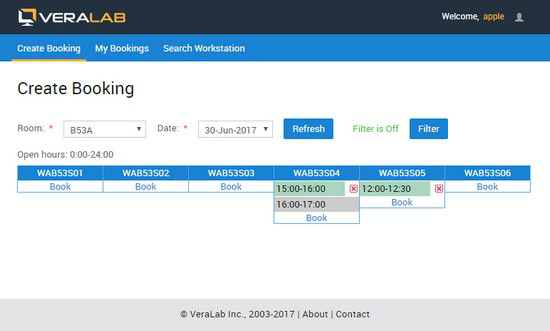
- See availability at a glance. After choosing a room and a date, users see a grid of the room's workstations with the time slots already reserved, and a Book link for each one.
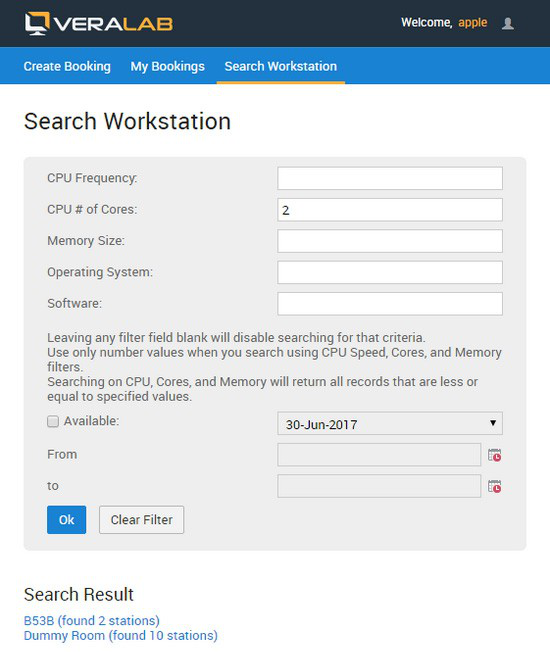
- Find the right computer. Search for workstations by CPU frequency, number of cores, memory size, operating system, installed software and availability, and get the list of rooms where matching workstations are found.
- Manage their bookings. View, edit or cancel existing reservations on the My Bookings tab.
Automatic Booking Rules
Every booking is checked automatically against your lab rules:
- Reservations are allowed only within each lab's open hours, and never overlap an existing booking or a class booking.
- Bookings can be limited in length (60 minutes by default) and by a daily quota per student.
- Students can book in advance; immediate bookings can be allowed with the Booking Buffer Time setting.
- Stations marked as unavailable cannot be booked, and students on the Ban list cannot make reservations until the ban is removed.
- On the lab computer, the VeraLab client enforces the reservation: when a booking starts, it displays a message and logs out anyone other than the user who booked the station.
Class and Block Bookings
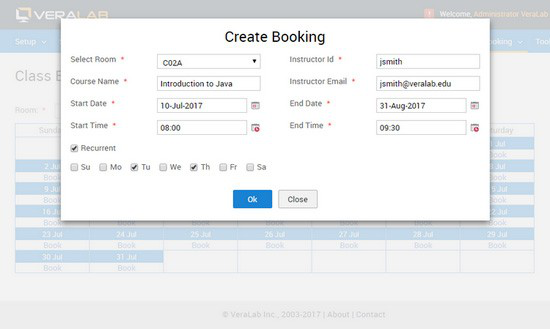
Users with the Booking Administrator role can reserve an entire room for a class, once or on recurring days, up to six months ahead. Any overlapping individual bookings are canceled and email notifications are sent out. Class bookings can also be imported in batch from an Excel (.xlsx) file.
Booking Reports
Booking Administrators get dedicated booking reports: reservation schedules, number of bookings per room, bookings by workstation, block bookings as a share of open hours, booking search with filters such as Booked, Completed and Canceled, and booking utilization, including booked logins vs. total and cancellation rates.
Availability
Since VeraLab 9.3, the Booking App is built into the VeraLab Standard and Enterprise Edition installers as an optional component, so there is no separate product to install. A Booking App license enables the module; existing customers can request a trial license from sales@veralab.com.
For setup steps, booking rules in detail and the full list of reports, read the Booking App Guide.