Computer Lab Software for Community Colleges
Community colleges keep open computer labs, tutoring and learning centers and classroom labs running for students who come and go at every hour of the day. Most of that work falls on a handful of staff and part-time student workers. Open hours have to be covered, every session should belong to a current student, lines form at the busiest times of the term, software licenses for every seat eat into the budget, and administrators want usage numbers before they fund another lab.
VeraLab is computer lab management software for colleges, universities, schools and training centers. It handles student sign-in, waitlists, workstation locking, monitoring, issue tracking, staff clock-in and payroll, software metering and reporting from one web-based console, so a small team can run more labs with less effort.
Staffing Open Labs with Fewer People
With self-service sign-in, students log in to any available workstation with their directory account, and lab personnel can focus on technical and customer support rather than access control. VeraLab still checks every login against the Alert List and the workstation's availability, and records it in the access log. Sign-in is set per room, so a staffed learning center can use counter sign-in at the front desk while an open lab runs self-service.
Managers see the current status of every lab through the Manager Dashboard from anywhere, so one supervisor can oversee several rooms or campuses without being on site. One VeraLab customer described the effect on staffing like this:
“VeraLab is working very well. Since installing it and adding in the custom LDAP and enrollment verification modules our staffing requirements in the lab have dropped to about 1 - 2 hours per week from about 40 - 50 hours per week”
— Matt Norby, IT Director, CSU Chico
For the staff you do schedule, VeraLab tracks attendance. Lab assistants clock in and out with every shift, managers build shift schedules and coverage charts, coverage reports use actual clock-in and clock-out times, and payroll is calculated from each employee's rate and attendance and exported for HR or Accounting. Access to the clock-in task can be restricted by IP address or range, and the payroll reports can show all users or only currently active ones.
Learn more: Staff clock-in, shifts and payroll · Lab sign-in and waitlists
Enforcing Student Sign-In
- Directory and single sign-on. VeraLab integrates with LDAP and Microsoft Active Directory for workstation sign-in, and supports single sign-on (SAML) for the VeraLab web application. See the LDAP configuration guide and the SSO with Microsoft Azure SAML guide.
- Counter sign-in with ID cards. At a staffed desk, lab assistants sign students in from the Lab Assistant Dashboard, which can be integrated with card readers or barcode scanners to read student ID cards.
- Student ID validation. If you need a higher level of authentication, VeraLab Inc. will help develop an ID validation plugin module to verify student IDs against a student database of your choice.
- Locking tied to sign-in. In Strict mode a workstation stays locked until a student is signed in to it and locks again at sign-out. Locking modes can be set for the whole system and overridden per room or workstation, and students are warned several minutes before their session times out, so they can finish before the workstation is locked.
- Alert List and access logs. Known violators can be added to the Alert List with threat levels, and staff are warned when they try to sign in. The access log shows who used which workstation and when.
Learn more: Workstation locking, security and monitoring · Sign-in scenarios: counter vs. self-service
Waitlists and Reservations at Busy Times
When students cannot find a free computer during busy times, VeraLab gives them a fair place in line and gives staff a clear view of every room.
- Waitlists. When no workstation is available, students can be added to a waitlist and wait for any machine in a room, a machine of a particular type, or one particular machine. Lab assistants are notified as soon as a waitlisted student can be assigned a computer.
- Occupancy across rooms. Lab assistants see the occupancy of all rooms and can redirect incoming students to under-occupied rooms.
- Real-time availability. The Student Portal shows real-time lab availability and open hours.
- Reservations. The optional Booking App module adds individual computer and class reservations, integrated with VeraLab.
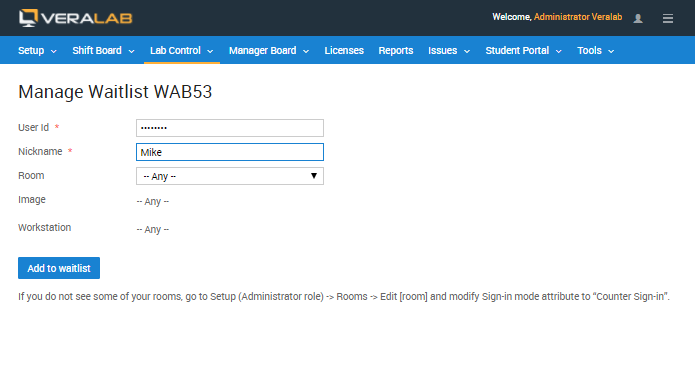
Learn more: Lab sign-in and waitlists
Classroom Labs and Testing
- Class reservations. An entire room can be marked as reserved for a class, and the instructor can decide whether other students may use the remaining workstations.
- Remote locking. Staff can lock or unlock individual workstations or entire rooms from the central console to prepare a room for instruction.
- Monitoring during tests. Security administrators can take screenshots of user displays as evidence of malicious activity or cheating during tests, view and end the processes running on a workstation, and send messages or announcements to workstations.
- Blocked software. VeraLab can prevent students from running particular applications, such as games, file exchange clients or instant messengers, and from launching software from a flash drive or CD/DVD drive.
Learn more: Workstation locking, security and monitoring
Cutting Software License Costs
Specialized course software is often too expensive to license on every lab computer. VeraLab's concurrent license management limits how many students can use an application at the same time across the lab, so you can install it on every workstation, keep one disk image for the whole lab, and buy only the number of licenses you need. When the limit is exceeded, VeraLab can shut down the most recently launched instance, or, in info-only mode, just record the violation. Application usage and cost of ownership data show which licenses are worth renewing.
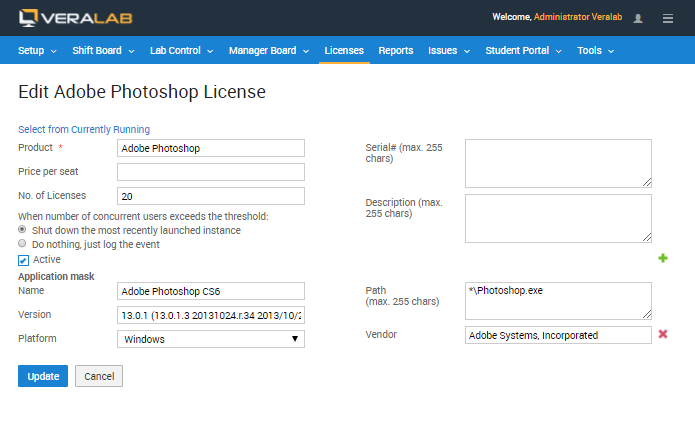
Need software metering beyond your labs, such as on staff computers? License Patrol is our standalone software metering and concurrent license management product.
Keeping Lab Computers in Service
Lab assistants log workstation problems in VeraLab's built-in issue tracker, and technicians are notified by email. Issues can be ranked by severity, type, priority and status, staff and technicians collaborate by adding notes, and out-of-order workstations can be marked unavailable so students are not signed in to them. Because every issue is tied to a workstation, managers can analyze maintenance costs and recurring hardware failures when planning purchases.
Learn more: Issue tracking and maintenance
Reporting Usage to Justify Funding
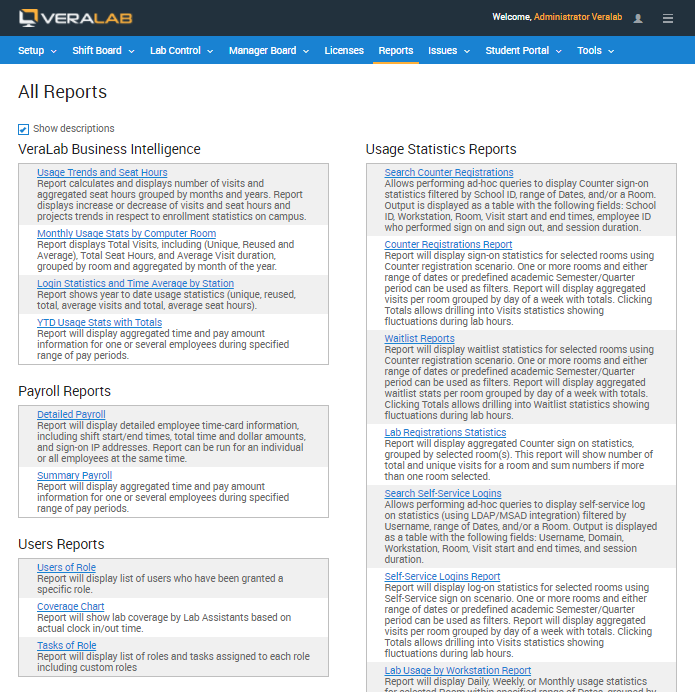
VeraLab collects usage data automatically and presents it in tabular and graphical reports that are ready to share with leadership. Built-in reports include:
- Usage Trends and Seat Hours: visits and aggregated seat hours by month and year, with trends projected in respect to enrollment statistics on campus.
- Monthly Usage Stats by Computer Room: total, unique and reused visits, total seat hours and average visit duration for each room.
- Counter and self-service sign-in reports: visits per room by day of the week, with drill-down into lab hours, plus sign-on activity by hour of the day.
- Waitlist reports: waitlist statistics per room, grouped by day of the week.
- Payroll and coverage reports: staff hours, pay and lab coverage based on actual clock-in times.
Reports can be run for your own academic periods, such as a semester or quarter, and exported to Microsoft Excel.
Learn more: Reports and analytics
Who Uses VeraLab
Community colleges on VeraLab's customer list include:
- Dallas County Community College District
- Guilford Technical Community College
- Holyoke Community College
- Monroe County Community College
- Portland Community College
- Queensborough Community College
- Rio Salado College
- Santa Monica College
“VeraLab has proven itself over and over again in our computer lab. We are able to track how many students are seen in an hour, a day or a week and determine an average amount of time each student spends in the lab. This has helped us to rearrange schedule to have more assistance on hand during peak periods as well as determine what products the students are using.”
— M. Jane Dunne, Director of Assessment Center and Titan Hub
Guilford Technical Community College
See where VeraLab is in use on our customer map.
Related Features
Try VeraLab on Your Campus
Download a free 30-day trial and run it in one of your labs, or contact us to talk through your college's sign-in, licensing and reporting needs.