Library Computer Management Software
Public-access computers and library computer labs are some of the busiest equipment a library runs. A small desk staff has to keep an eye on dozens of workstations, make sure every computer session belongs to someone, give patrons a fair turn when every seat is taken, keep the software people ask for licensed, and show administrators and funders how heavily the computers are used.
VeraLab is computer lab management software built for university, college, school, training center and library environments. It brings sign-in, waitlists, workstation locking, monitoring, issue tracking, staff scheduling, software metering and usage reporting together in one web-based console, so public, academic and school libraries can run their computers with less effort and better data.
Sign-In and Controlled Access to Library Computers
VeraLab supports both ways libraries hand out computers, and you can use each where it fits:
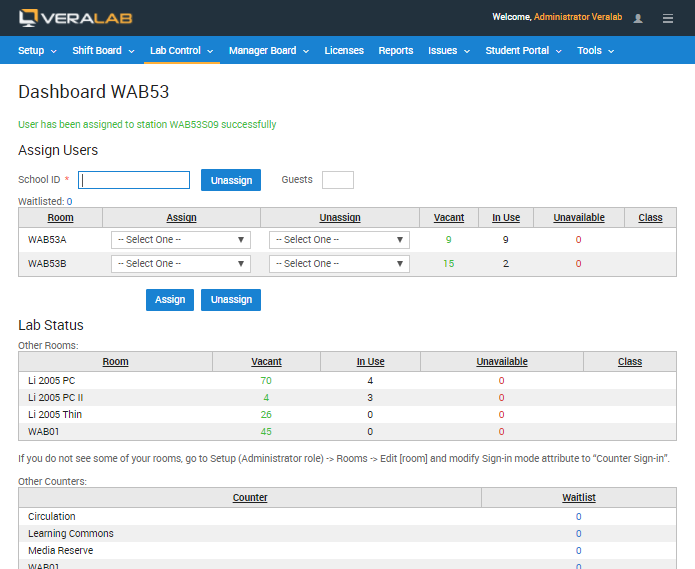
- Counter sign-in at the desk. Staff assign each patron to a workstation from the Lab Assistant Dashboard. The dashboard can be integrated with a card reader or barcode scanner to speed up sign-in, shows vacant, in-use and unavailable workstations for each room, and can record the number of guests accompanying a user.
- Self-service sign-in. Where users have accounts in a directory such as LDAP or Microsoft Active Directory, as in many academic libraries, they log in at any available workstation. VeraLab checks every login against the Alert List and the workstation's availability and logs the user out if either one prohibits the session.
Locking keeps unassigned computers out of use. In Strict mode a workstation stays locked until a user is signed in to it and locks again when the user signs out; Liberal and None modes are available where you want less control. Locking modes are set for the whole system and can be overridden for individual rooms and workstations. Users are warned several minutes before their session times out, so they can finish their work before the workstation is locked.
Learn more: Lab sign-in and waitlists · Workstation locking, security and monitoring
Waitlists and Availability at Busy Times
When every public computer is taken, VeraLab keeps the line orderly instead of leaving staff to manage it on paper.
- Waitlists. When no workstation is available, users can be added to a waitlist and choose to wait for any machine in a room, a machine of a particular type, or one particular machine. Staff are notified as soon as a waitlisted user can be assigned to a computer.
- Occupancy across rooms. If your computers are spread across several rooms or floors, staff see the occupancy of all of them and can send incoming users to the rooms with free seats.
- Real-time availability for users. The Student Portal shows real-time lab availability and open hours.
- Reservations and instruction sessions. An entire room can be marked as reserved for a class, and the instructor can decide whether other users may take the remaining workstations. The optional Booking App module adds individual computer and class reservations, integrated with VeraLab.
Safe, Accountable Public Computers
Shared computers attract misuse. VeraLab gives library staff the records and tools to deter it and to respond when it happens.
- Access logs. Every sign-in is saved to the access log, so staff can find who used a particular workstation at a particular time, or every workstation a particular user has occupied.
- Alert List. Known violators can be added to the Alert List, with threat levels for different kinds of violations. Staff are warned when someone on the list tries to sign in.
- Blocked applications. VeraLab can prevent users from running particular applications, such as games, file exchange clients or instant messengers, and can stop software from being launched from a flash drive or CD/DVD drive.
- Monitoring. Authorized administrators can view the processes running on a workstation and end them, take a screenshot of a user's display as evidence, and send messages or announcements to workstations. Custom screen banners, such as logos or announcements, can be broadcast to client displays.
Learn more: Workstation locking, security and monitoring · Establishing a secure lab environment
Running the Desk with a Small Staff
VeraLab cuts down the routine work around public computers and makes it easier to supervise the people who handle it.
- Remote supervision. Managers see the current status of every room through the Manager Dashboard from anywhere, without needing to be on site.
- Clock-in, shifts and payroll. Desk staff and student workers clock in and out with every shift. Managers build shift schedules and lab coverage charts, coverage reports are based on actual clock-in and clock-out times, and payroll is calculated from each employee's rate and attendance records and exported for HR or Accounting. Access to the clock-in task can be restricted by IP address or range.
- Issue tracking. Staff log a problem with a workstation, and technicians are notified by email. Out-of-order computers can be marked unavailable so nobody is signed in to them until they are fixed, and staff and technicians can collaborate on each issue with notes.
Learn more: Staff clock-in, shifts and payroll · Issue tracking and maintenance
Controlling Software License Costs
Patrons expect the same software on every computer, but licensing it on every seat is expensive. VeraLab's concurrent license management limits how many people can use an application at the same time across the lab, so you can install the software on every workstation and still buy only the number of licenses you actually need. When the limit is reached, VeraLab can shut down the most recently launched instance, or, in info-only mode, simply record the violation. Software usage and cost of ownership data help you decide which licenses to renew.
If you need software metering on its own, outside the library computer lab, License Patrol is our standalone software metering and concurrent license management product.
Usage Reports That Justify Funding
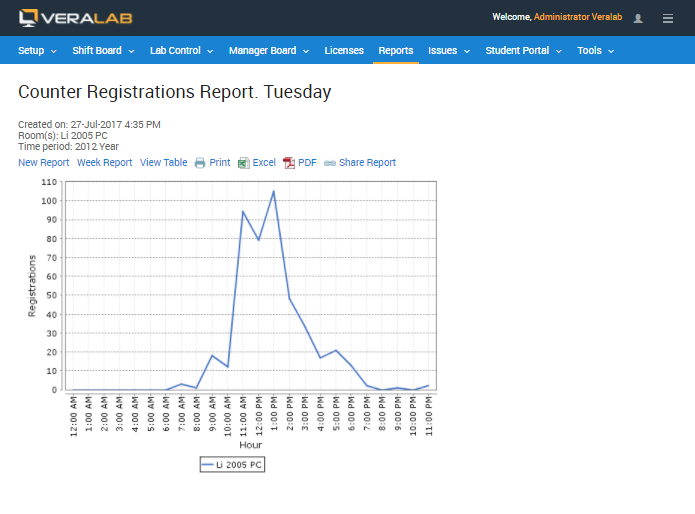
VeraLab collects usage data automatically as people sign in and out, and turns it into tabular and graphical reports you can share with leadership or present in a meeting.
- Sign-in activity by day of the week and by hour of the day, to find peak times and plan staffing.
- Monthly usage statistics by computer room, including total visits, total seat hours and average visit duration.
- Waitlist statistics for each room, showing when users had to wait for a computer.
- Application usage and cost of ownership data for licensed software.
- Report periods you define yourself, such as a semester or quarter, set up in the Semesters task.
Reports can be exported to Microsoft Excel. If you ever need to shorten open hours, the usage data pinpoints the lower-traffic periods where the change will affect the fewest users.
Learn more: Reports and analytics
Works with Your Existing Computers
- Windows and macOS. The VeraLab client runs on Windows and macOS workstations, and starting with VeraLab 26.1 a single unified client covers every sign-in method, with the sign-in mode set per room or department from the server.
- Deep Freeze and similar tools. If your public computers use Deep Freeze or a comparable freeze/restore product, allow writes to the VeraLab registry branch so client mode changes persist. See What's New in VeraLab 26.1 for details.
- Multi-session and VDI. Starting with version 9.1, VeraLab can be used in multi-session environments such as Citrix servers or VDI. This requires a multi-session license.
- Central updates. VeraLab client software can be updated and upgraded directly from the server.
Who Uses VeraLab
VeraLab is used by universities, colleges, schools and other organizations around the world, including library staff at James Madison University. Here is what a library administrator there told us:
“I really am impressed with your level of customer service, and the attention that VeraLab has provided us for customizing and tailoring their product to our environment”
— Chris R Huffman, Library Admin, JMU
See where VeraLab is in use on our customer map.
Related Features
Try VeraLab in Your Library
Download a free 30-day trial and set it up on a few of your own public computers, or contact us to talk through your library's sign-in and reporting needs.